
Free
¥0
10 songs/month
MP3 exports with a free account. 3 songs/month without signup.
Separate audio. Edit music. Work with images and PDFs.
Choose the service you need.
Isolate vocals and instruments from a song, then adjust volume and effects as you listen.
Choose a file on the next screen.
3 songs/month without signup. 10 with a free account.
Usukurenai no mamade / Lunaron · 24-second separation sample
Press play to compare the original, vocals and backing. S solos a part; M mutes it.
Results vary by song. Try separation with your own audio, too.
Find work saved in this browser in Workspace.
Find the sound inside the song.
Extract vocals, drums, bass, and other instruments. Listen to each part with Solo / Mute.
Use separationGive your sound a new direction.
Apply reverb, tempo, pitch, and spatial audio to your own files, with or without separation.
Use effectsTurn your stems into a project.
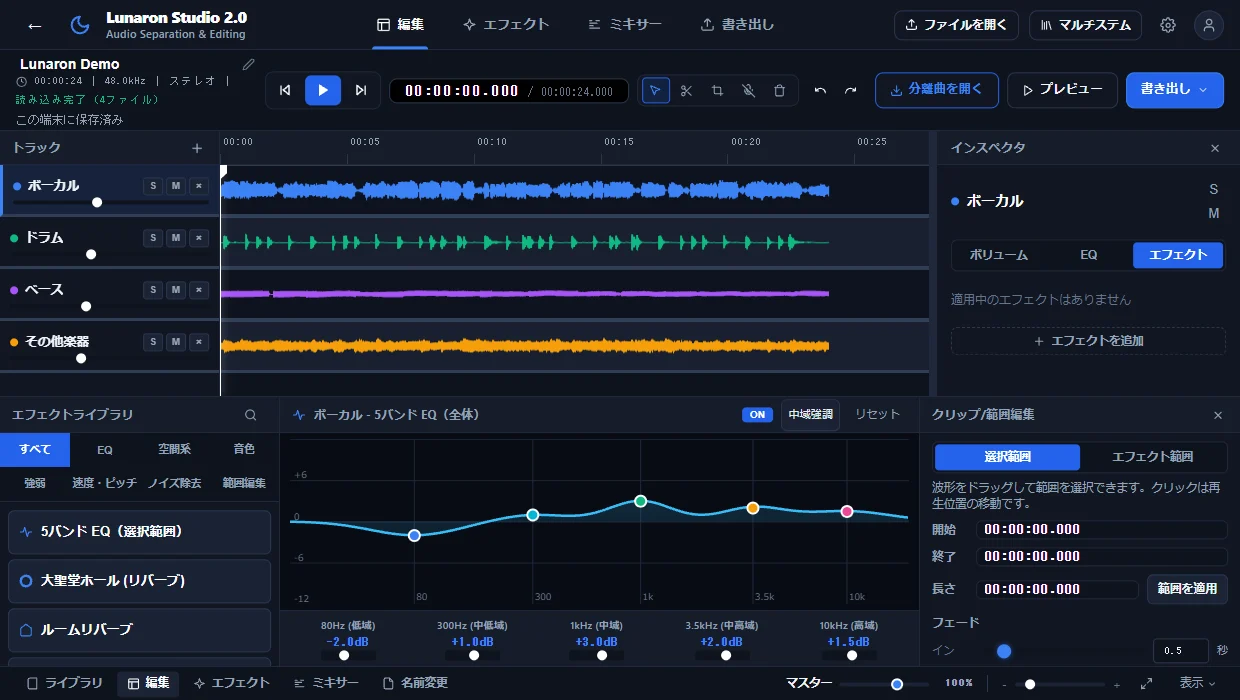
Arrange separated audio on a timeline, adjust volume and effects, and export. A workspace for Pro.
Open StudioChoose an audio or video file.
Choose a separation mode and start processing.
Use Solo / Mute, volume, and effects.
Export, share, or move to Studio.
Lunaron Studio 2.0 Pro plan
Balance vocals and backing, apply effects to specific sections, and export your mix as WAV.
Extract backing and find a comfortable key.
Read the guide (Japanese)Adjust balance and spatial sound.
Read the guide (Japanese)Repeat isolated bass and drum parts.
Read the guide (Japanese)Shape how voices and music are heard.
Read the guide (Japanese)Explore the layers within a recording.
Read the guide (Japanese)Try the free allowance first. Choose formats and tools as your work grows.
Compare pricing and limits¥0
10 songs/month
MP3 exports with a free account. 3 songs/month without signup.
¥680 / month
100 songs/month
WAV exports and priority processing.
¥2,980 / month
Includes Studio
No monthly song limit for standard separation. Deep separation, effects and other features have separate conditions.
You can separate 3 songs per month without signup, or 10 with a free account. The free tier exports MP3. WAV exports require Lite or above; Studio editing requires Pro.
Results depend on the recording, mix and overlapping instruments. Other parts or reverb can remain audible. Compare the demo and your own results to decide whether they suit your use.
You can use a browser on your phone. Audio playback requires a user action. Longer files and projects with many tracks depend on your device’s available memory and performance.
Separation sends audio to the processing server. New share links store audio for playback for up to seven days; storage management may remove it earlier. Unavailable links show instructions to request a replacement. See the Privacy Policy for details.
Choose a file, then select the parts you want to separate.